Rails Security in Times of AI-Driven Scanners
AI-driven scanners now probe small Rails apps for credentials and known exploits. How I use Rack::Attack, fail2ban, Cloudflare, and AI audits to fight back.
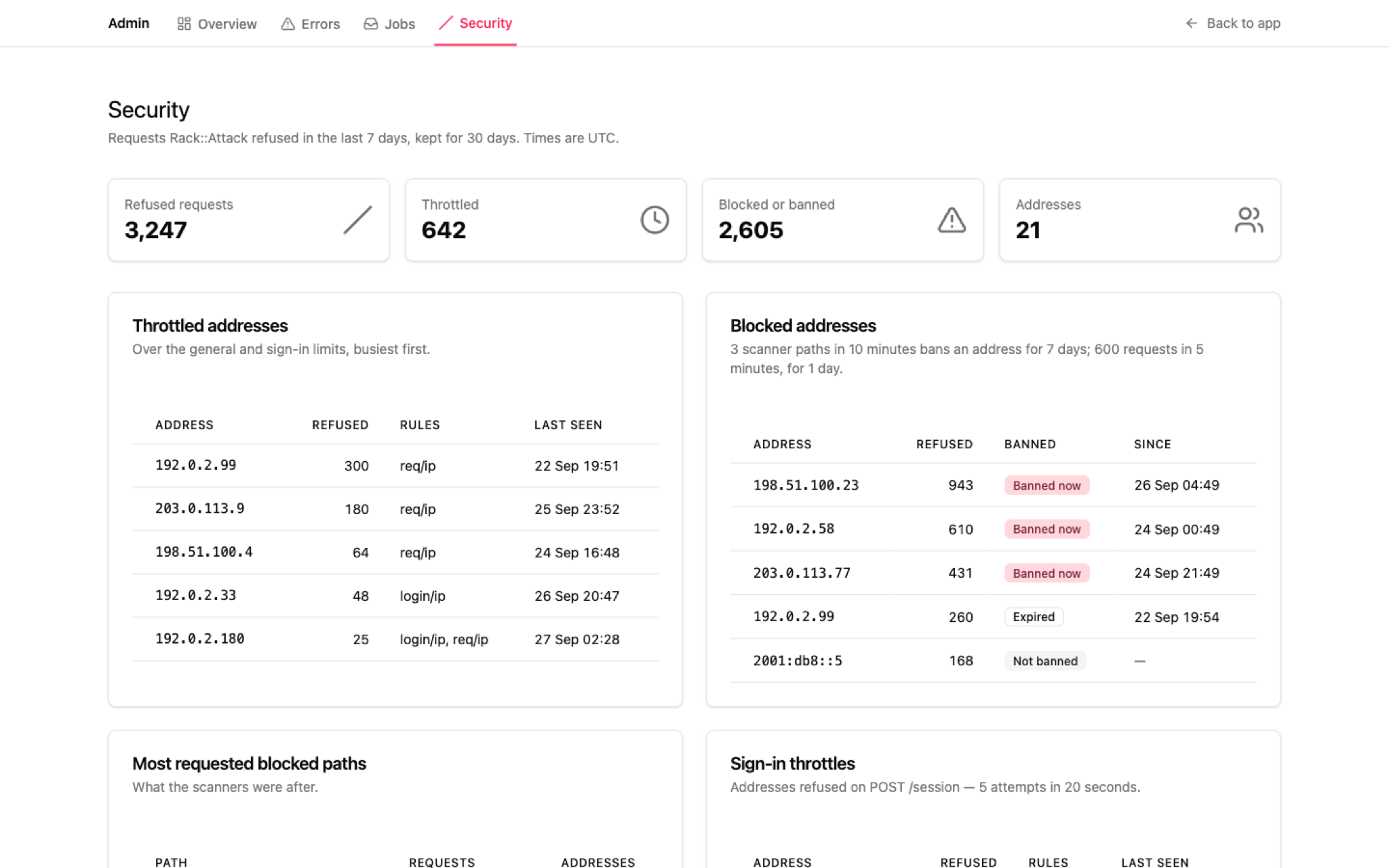
A few weeks ago, I noticed something odd in my Rails applications. Apps used by only a handful of people were getting a very abnormal increase in requests. In the last seven days alone, Rack::Attack refused 3,247 requests from just 21 addresses, on applications that normally see almost no traffic from strangers.
Scanners are nothing new. Since day one, I set up Rack::Attack on every application to block them, and for years I’ve seen the same probes for WordPress and Joomla vulnerabilities and Linux misconfigurations. But this time it was different.
The scanners switched to Node and JS frontend holes, and they also looked for Rails credentials, config files, and master keys. They even found that I’m running a Plausible CE instance and tried to exploit a vulnerability to execute remote code on the Erlang VM. That’s not a generic script hitting random paths; that’s something AI-driven figuring out what I actually run and going after it.
Why this is happening now
By now, we’re all aware of the announcements about autonomous hacking by AI from the companies running frontier models in the US. As a Rubyist, I’m also aware of the incidents on rubydoc.info and rubygems.org, discussed on rubyhack.ai and explained at the end of Aaron Patterson’s keynote at Rails World.
While the targets of these autonomous attacks might, for now, be visible entities, like the UK Government via RubyDoc, the reality is that people are using the same tools to find holes in any application they find on the Internet. Including small apps like mine.
I suffered no real harm beyond thousands of requests wasting bandwidth and resources. But it annoyed me enough to harden my settings and change how I conduct security audits on my code.
In the past, I wrote two posts about Rails security: Rails Has Your Back: Security You Don’t Have to Think About and The Security Work That’s Actually on You. The first covers what Rails does out of the box; the second covers the steps you need to take yourself. This post is about what I added on top of that.
The Tools I Use to Harden Rails Apps
Rails Simplifier
The Rails Simplifier skill is part of my Definition of Done (DoD), and I described how it fits my workflow in How I actually use AI to write Ruby on Rails code. My AI coding agents run it before every commit, and it has rules on how my Ruby and Rails code should look and what it should not do. For example, it ensures queries are tenant-scoped: every lookup starts from the signed-in user’s account, as in Current.account.gallery_exhibitions.find(params[:id]), never a bare Gallery::Exhibition.find(...). That way, another account’s record raises RecordNotFound and returns a 404, just like an id that doesn’t exist. I’d argue it’s my first line of defense.
Rails Security Auditor
The Rails Security Auditor skill is one I run from time to time. It scans for production configuration problems, security headers, Content Security Policy, cookie configuration, rate limits and Rack::Attack configuration, and many other areas where security could be at risk. Because it knows my production setup and deployment pipeline very well, it also suggests changes to the Cloudflare configuration for each app based on its needs.
For example, Content Security Policy is just a placeholder in every new Rails application; the Rails Security Auditor makes sure it’s configured for the needs of the application being audited.
Maquina generators
The Maquina generators gem has a generator that installs a Rack::Attack configuration focused on stopping abuse from scanners, not only by throttling but also by using fail2ban to ban IPs. The defaults are opinionated and come from what I’ve faced in my own apps: three scanner paths in 10 minutes bans an address for 7 days, 600 requests in 5 minutes bans it for a day, and sign-in is limited to 5 attempts in 20 seconds.
It also has a generator for a Rack::Attack dashboard and a database table that persists offending requests for later investigation.
My AI-Assisted Security Audit Process
Here is how I use these tools together.
I ask the AI agent to use the Rails Simplifier skill along with the Rails Security Auditor skill to produce a report, ranked by severity, of the security issues that need to be addressed in my application.
Alongside that report, I ask it to audit queries whose conditions could leak data between tenants, and to check whether Action Text and Active Storage blobs could leak between tenants where no security validation is enforced.
Then I share anonymized logs from the Rails application, along with the data captured by Rack::Attack, to audit controller rate limits and the Rack::Attack configuration. I also ask the report to include Cloudflare security settings that can be improved, along with security and page rules that keep malicious requests from reaching the Rails app at all.
Once the report is done, I review each suggestion one by one. On some, I push back and ask for more evidence. Then I implement the changes one at a time, each with its own deploy, and ask the model to verify that the setting does what it’s supposed to do.
Cloudflare security rules built from real data cut off scanners before they reach my Rails apps and waste resources, but they need maintenance to stay up to date.
Then, by monitoring Cloudflare and the Rack::Attack dashboard, I repeat the process.
Where to start
AI agents write a lot of our code now, and that same capability is being pointed at our applications. The answer isn’t to stop using them; it’s to use them on the defensive side with the same discipline: a report you can review, changes you can verify, and a human deciding what ships.
If you run Rails apps, start with the basics: put Rack::Attack in front of your app, persist what it refuses so you can see what scanners are after, and audit tenant isolation, including your blobs. Then look at your own logs. If you haven’t looked in a while, you might be surprised by who’s knocking.