
Fragua: An AI Harness for Building Software with Rails
Why I'm building Fragua — a Rails app that orchestrates AI agents through the whole arc of building software, with the work kept visible throughout.
For a while now my AI workflow has been split in two, and the split annoyed me.
I do a lot of work in Claude Desktop. At some point I built a tool called the MVP Creator — you give it an idea, and it produces the product brief, the research, an MVP plan, a brand guide. On Desktop those come back as Markdown artifacts that are actually pleasant to read. The same documents scrolling past in a terminal are not.
But the building happens in the terminal. So I’d generate these documents in Claude Desktop, then copy them back and forth to make them available to Claude CLI. Once I was building, I’d end up with a row of Tmux panels, each running a CLI session, me bouncing between them trying to keep track of what every agent was doing. Planning had the same problem in reverse: I’d plan in the CLI, where a long, detailed plan is exactly the kind of thing a terminal is worst at showing you.
None of this was broken, exactly. It just felt like I was the integration layer — the human glue holding together tools that didn’t know about each other. So I started building the thing that would hold it together. That’s Fragua.
I’ve spent a long time as a Ruby on Rails consultant — mostly with companies in the US and with fintechs in Mexico — so when I build a tool for building software, I build it opinionated, and I build it for Rails.
What Fragua is
Fragua is a Ruby on Rails application that orchestrates AI agents through the whole arc of building a Rails app, in one place, with the work kept visible the entire time.
You start with an idea and move through phases. You research it. You plan it — the product brief, the MVP plan, the brand guide, the technical guide; the MVP Creator’s output, but native instead of copy-pasted. You scaffold the foundation of the app. You shape a spec for a feature. Then an agent implements that feature and opens a pull request.
Every phase produces artifacts that persist and stay readable, and every later phase has access to everything that came before. No copying documents around. No guessing what the agent in panel three is up to.
Why, and not bolt.new or Lovable
I looked at tools like bolt.new and Lovable before I started. They’re impressive, and for a lot of people they’re the right thing. But they felt like vibecoding to me, and they’re built around stacks I don’t use.
Vibecoding is fine when it’s one person chasing an idea on a weekend. It falls apart the moment you’re a company with a team of developers and product managers, because there’s no canonical way to bring AI into how that team actually works — no shared structure, no visibility into what the agents did, no way to look back and improve how you’re using them.
That’s the gap Fragua is for. It’s opinionated on purpose: structured phases instead of a chat that sprawls, the agent’s work visible instead of hidden, and a record you can learn from afterward. Quality, control, and consistency are table stakes. The two things I care about beyond that are cost control and observability into how the agents behave — because once a team is running many agents on real budgets, those are the things you can no longer just eyeball.
How it works
A few principles run through the whole thing.
You stay in control. You approve the plan, in plain language, before an agent touches code. Agents don’t get to make architectural decisions on your behalf and surprise you later.
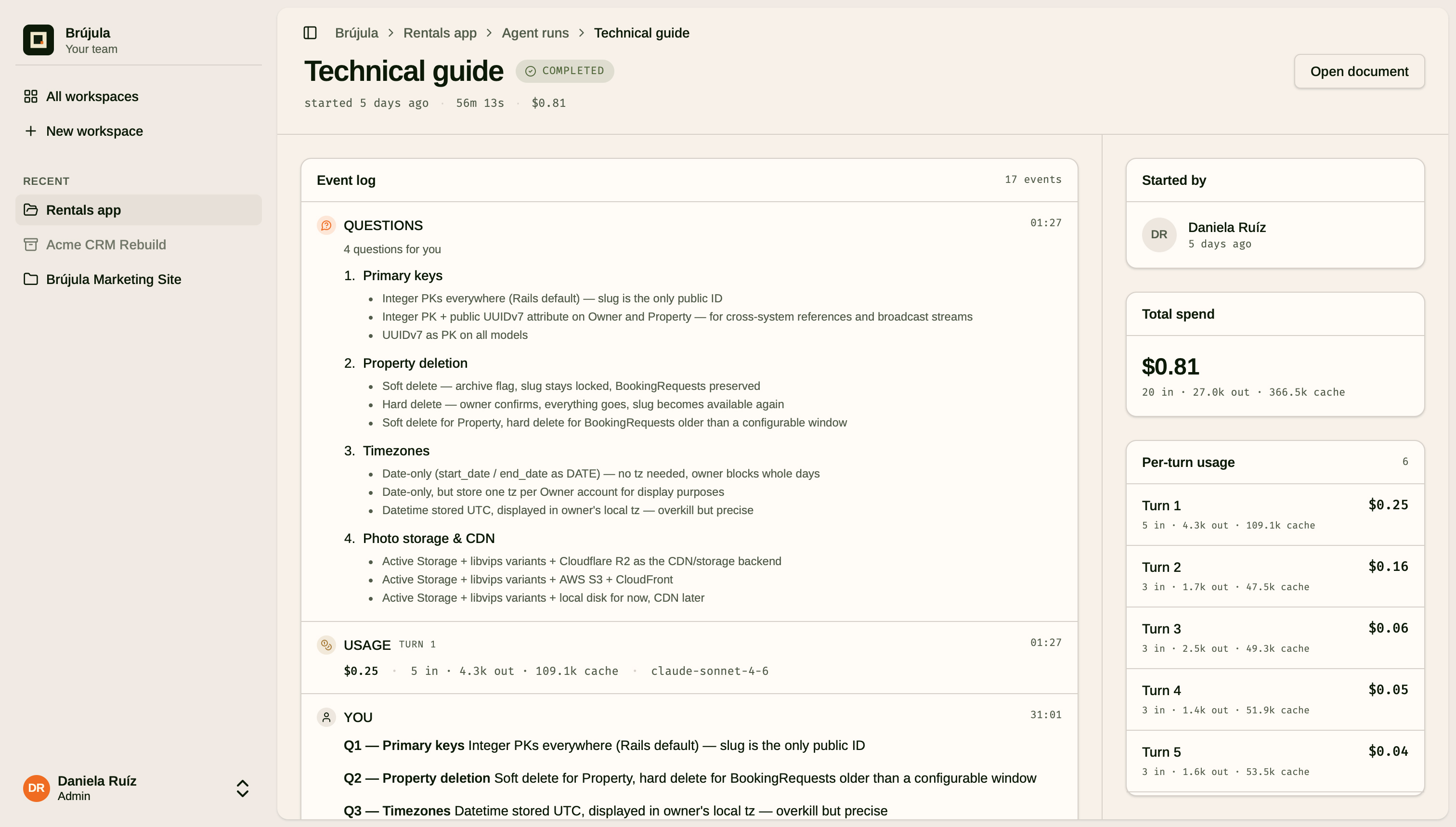
The work is observable. You watch runs as they happen, you see what each agent did, and you see what it cost — per run, per workspace, over time. The same goes for behavior: which model ran, how much reasoning it used, where something failed. The history is there to be read, not buried.
You own your tools. You bring your own AI key. Fragua doesn’t proxy your calls or mark up your usage. Your keys, your account, your code.
About the name and the mark
Fragua is Spanish for forge — the place where raw material is heated and shaped into something. That’s the metaphor. It’s also deliberate: the web defaults to English, and I’ve decided to name what I build with Spanish words and sounds. A small thing, but mine.
The logo follows the same instinct. It’s inspired by the Mexican architect Luis Barragán — a dark square mass, a warm off-white void set inside it, and a small marigold spark cantilevered at the void’s lower corner. Barragán built with bold planes of warm color, light, and a kind of quiet geometry, and that’s the feeling I was after: considered, warm, not loud. The spark is the ember in the forge — the work happening inside.
Who it’s for
I think Fragua is useful at a few levels. If you’re not a developer but you have an idea, the early phases — the brief, the research, the MVP plan, the brand guide — let you explore it seriously, up to the point where you’ll want a developer to carry it further. If you’re a solo developer, it works for you too. But it earns its keep most where there’s a team building together, and that’s the case the whole design keeps in mind.
Where it is right now
Honestly: early. Fragua is in private beta.
It’s a SaaS, not open source — though running it on-premises is something I want to support, because the teams I have in mind will ask for it. Today it’s built around Claude; moving to Codex and Pi is high on my list. Starting a new app from zero is in good shape. The next big piece I’m working on is bringing an existing app into Fragua and continuing to build on it there — which is, frankly, where most real work lives.
If any of this resonates — especially if you’re on a team trying to find a sane, structured way to actually build with AI, not just demo with it — I’d like to hear from you. Fragua lives at fragua.app. It’s early enough that feedback genuinely shapes where it goes.